Medallion Architecture in Azure Databricks: The Practical Guide
A practical guide to Medallion Architecture in Azure Databricks — what Bronze, Silver, and Gold layers do, what they cost, and when skipping a layer makes sense.

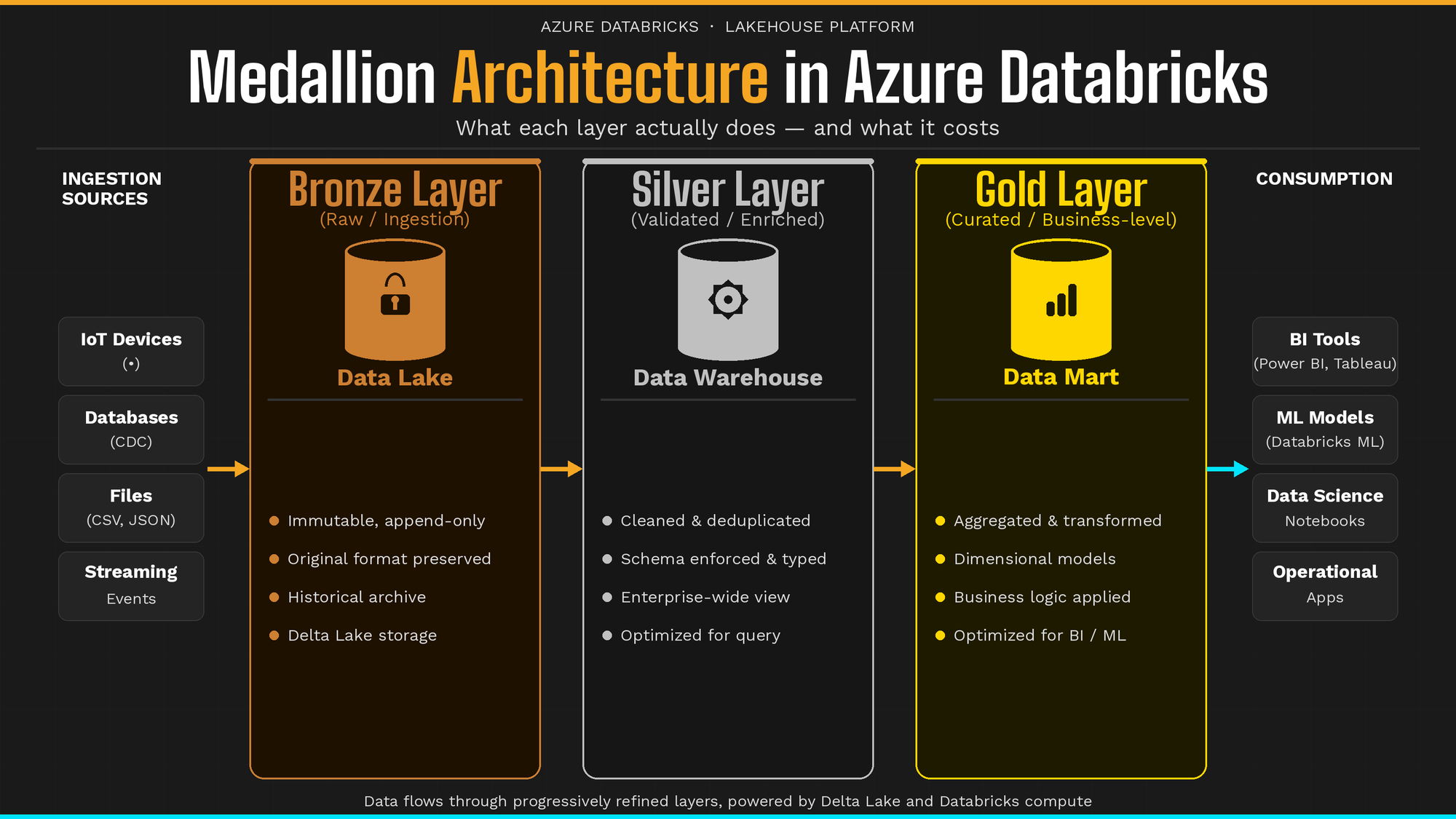
Medallion Architecture in Azure Databricks: The Practical Guide
7 min read
Medallion architecture has become the go-to standard for organizing data in a lakehouse — yet many teams overlook its full potential. It’s common to find Silver tables that are straight copies of Bronze with no transformation added. Teams skip layers to save compute, only to find Gold tables drifting out of sync. And teams that do implement all three layers correctly can still be surprised by the storage bill.
The pattern itself is sound. The details are where it gets complicated.
This guide walks you through what each layer actually does, what it costs (in storage, compute, and latency), and when skipping a layer is a legitimate architectural choice rather than a shortcut.
What Is Medallion Architecture? A Multi-Hop Data Design Pattern Explained
Medallion architecture is a multi-hop data design pattern that organizes your lakehouse into three progressive layers (Bronze, Silver, and Gold), each representing a higher level of data quality and refinement.
The goal isn’t bureaucracy. It’s a contract: each layer has a defined responsibility, a defined audience, and a defined quality bar. Data flows forward through the layers; it doesn’t flow backward.
In Azure Databricks, each layer maps to a schema within a Unity Catalog catalog (Databricks’ unified governance layer for data and AI assets). If you’re using Microsoft Fabric, the same concept applies to Fabric lakehouses backed by Delta tables:
-- Unity Catalog (Azure Databricks)
your_catalog.bronze.orders
your_catalog.silver.orders
your_catalog.gold.daily_revenue

-- Microsoft Fabric (equivalent)
bronze_lakehouse.dbo.orders
silver_lakehouse.dbo.orders
gold_lakehouse.dbo.daily_revenue
Delta Lake underpins every layer, giving you ACID transactions (Atomicity, Consistency, Isolation, Durability), schema enforcement, time travel, and the ability to reprocess historical data when business logic changes.
General best practices are described throughout. Tailor storage paths, retention policies, and Unity Catalog configurations to your specific Azure environment.
Bronze: The Raw, Immutable Foundation
Bronze is where raw data lands. It arrives from Azure Event Hubs, ADLS Gen2 (Azure Data Lake Storage), Salesforce, your legacy database, exactly as-is, with no transformation applied.
The defining rule of Bronze is immutability. Data is append-only. You never overwrite a Bronze record. If something came in wrong, you still store it, because the wrongness itself is data. That record is your proof of what the source sent you and when.
Store most fields as STRING or VARIANT rather than casting to native types. Source systems change schemas without warning. If you cast amount to DECIMAL at ingestion and the source starts sending "N/A" for missing values, your pipeline breaks. Strings don’t break. Strings survive.
Add two metadata columns to every Bronze table:
from pyspark.sql.functions import current_timestamp, input_file_name

source_path = "abfss://raw@yourstorage.dfs.core.windows.net/orders/"
checkpoint_path = "abfss://lake@yourstorage.dfs.core.windows.net/checkpoints/bronze_orders"
schema_path = "abfss://lake@yourstorage.dfs.core.windows.net/schemas/bronze_orders"

df = (
    spark.readStream
    .format("cloudFiles")
    .option("cloudFiles.format", "json")
    .option("cloudFiles.schemaLocation", schema_path)
    .option("cloudFiles.cleanSource", "archive")
    .option("cloudFiles.sourceArchiveDir", "abfss://archive@yourstorage.dfs.core.windows.net/orders/")
    .load(source_path)
    .withColumn("_ingested_at", current_timestamp())
    .withColumn("_source_file", input_file_name())
    .writeStream
    .format("delta")
    .outputMode("append")
    .option("checkpointLocation", checkpoint_path)
    .toTable("bronze.orders")
)
Bronze tables are not for analysts or data scientists. They’re for data engineers and for reprocessing pipelines when something upstream goes wrong.
Never apply business logic in Bronze. If your source system changes tomorrow, Bronze is your only safety net for a full re-process. The moment you add transformations here, you corrupt your audit trail and lose the ability to replay history with corrected logic.
Silver: The Enterprise View of Your Data
Silver is where the engineering happens. You take raw Bronze data and turn it into something reliable: types are cast, nulls are handled, duplicates are removed, and records from different source systems representing the same real-world entity are unified.
The word “enterprise” matters here. A Customer record in Silver isn’t “a row from the Salesforce export.” It’s your organization’s canonical definition of what a customer is, regardless of which source it came from or how many times it appeared in the stream.
from pyspark.sql.functions import lower, trim, col, to_date, row_number
from pyspark.sql.window import Window

silver_customers = (
    spark.readStream
    .table("bronze.customers")
    .withColumn("email", lower(trim(col("email"))))
    .withColumn("signup_date", to_date(col("signup_date_str"), "yyyy-MM-dd"))
    .withColumn("_row_num", row_number().over(
        Window.partitionBy("customer_id").orderBy(col("_ingested_at").desc())
    ))
    .filter(col("_row_num") == 1)
    .drop("_row_num")
    .writeStream
    .format("delta")
    .option("checkpointLocation", "abfss://checkpoints@yourstorage.dfs.core.windows.net/silver_customers")
    .toTable("silver.customers")
)
Silver is also where schema evolution is handled gracefully, absorbing new columns from source systems without breaking downstream consumers.
Data scientists and analysts land here. They get clean, detailed, granular data in a normalized form. Silver is not yet aggregated or shaped for any specific business question; it’s the reliable foundation from which those questions can be answered.
If your Silver table is a 1:1 copy of Bronze (no deduplication, no type casting, no schema enforcement), you’re paying for storage without adding value. Consider skipping Silver in that case. When Silver earns its place, it does so by representing a unified enterprise view of a concept that no single source system owns.
Gold: The Performance Layer
Gold is the consumption layer. It’s built for speed, not completeness.
Where Silver retains every granular record at full detail, Gold pre-aggregates and pre-filters for specific business questions: total weekly revenue by region, daily active users, feature tables for an ML model. Gold tables are wider, fewer in number, and optimized for the tools that query them: Power BI, Tableau, a Databricks SQL warehouse, or a model serving endpoint.
CREATE OR REPLACE MATERIALIZED VIEW gold.weekly_revenue AS
SELECT
    date_trunc('week', order_date) AS week,
    region,
    SUM(amount)                    AS total_revenue,
    COUNT(order_id)                AS order_count
FROM silver.orders
GROUP BY 1, 2;
Gold is domain-oriented, not source-oriented. You don’t build gold.salesforce_accounts. You build gold.sales_pipeline_summary, a table that answers a specific business question.
Some organizations create multiple Gold layers for different business domains: one for finance, one for marketing, one for operations. That’s a valid pattern, as long as each table has a clear owner and a clear question it answers.
Gold is for performance. When a BI tool or ML pipeline needs sub-second query response, pre-aggregate in Gold. But if your query engine can aggregate Silver at acceptable latency for your SLA, a pre-aggregated Gold table may not be necessary. Gold should earn its place too.
The Real Costs of Medallion Architecture
Storage: The 3× Multiplier
The math is worth stating plainly: 1TB of source data in Bronze can mean roughly 3TB total when replicated across all three layers at the same retention period. At typical Azure storage pricing, that’s a real line item.
Most teams mitigate this with tiered retention:
| Layer | Suggested Retention | Reasoning |
|---|---|---|
| Bronze | 30–90 days | Insurance for reprocessing; not needed long-term |
| Silver | 1–2 years | Source of truth for analytics |
| Gold | Indefinite | Business-critical, query-optimized |
Bronze is insurance. Ask yourself honestly: how often does your team actually reprocess from Bronze? If the answer is “rarely,” a 90-day retention window likely covers every realistic scenario.
Compute and Maintenance: The Real Cost
Storage cost is visible on your cloud bill. Compute and maintenance cost is what keeps engineers awake.
Each layer requires its own pipeline: monitoring, retries, schema evolution handling, and data quality checks. That’s three times the operational surface area. For a small internal dataset feeding a single dashboard, three pipelines maintained by two engineers creates overhead that may not justify the value.
This is the argument against applying medallion architecture uniformly. It works well at scale with complex, messy source data and multiple consumers. For simple, low-volume, single-consumer pipelines, the complexity is often the biggest cost.
Latency: The Hidden Trade-off
Every hop through a layer adds latency. If your use case requires near-real-time data (think: fraud detection, live operations dashboards), each additional layer between ingestion and consumption is a delay you need to justify.
Skipping Layers in Azure Databricks Medallion: A Decision Framework
Skipping a layer isn’t always wrong. It’s always a trade-off. Here’s how to think about it.
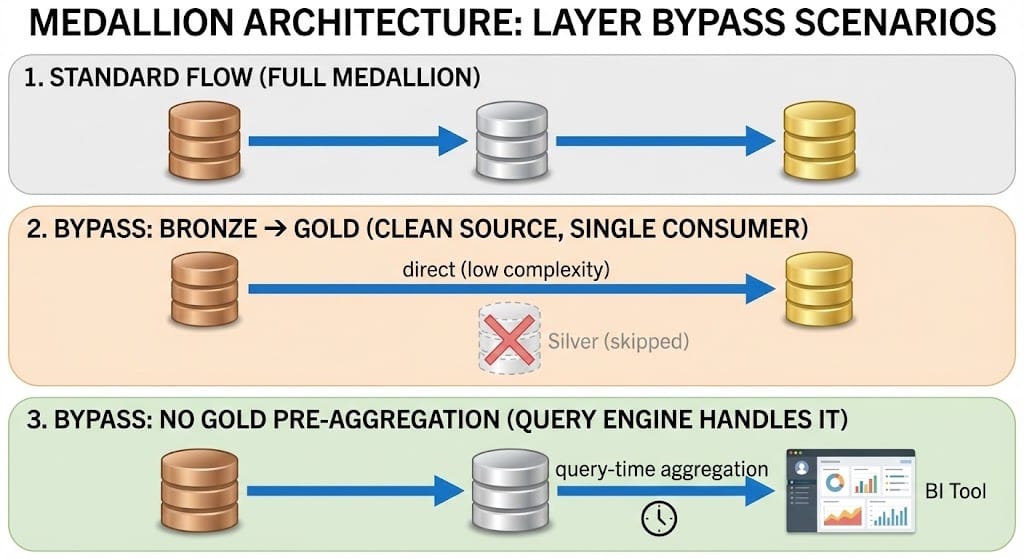
Bronze → Gold (Skipping Silver)
When it makes sense: - Source data arrives clean and well-structured (no deduplication needed, types are already correct) - Single consumer, single use case - No compliance or audit requirement for intermediate records - Low transformation complexity (1–2 operations at most) - Latency SLA makes each additional hop a problem
What you give up: - The ability to reprocess with different business logic without re-ingesting raw data - A reusable enterprise view of the entity for future consumers - Schema flexibility: any Gold-breaking change requires direct surgery on your ingestion pipeline
Silver → Gold (Querying Silver Directly)
When it makes sense: - Your BI tool or query engine can aggregate Silver at acceptable speed for your SLA - Data volumes are small enough that query-time aggregation doesn’t hurt - Aggregation business logic changes frequently, making materialization expensive to maintain
What you give up: - Query performance at scale - Cost efficiency for high-frequency aggregation workloads
The simplest rule: if Bronze = Silver (no transformation, no cleaning, no deduplication, just a copy), skip Silver. Don’t build a layer that adds nothing. Every layer should earn its place with a clear quality contract.
Medallion architecture isn’t a mandate. It’s a starting point. Build all three layers first, understand what each one is actually doing for you, and then make deliberate decisions about which ones to keep, consolidate, or eliminate. The architecture should serve your team, not the other way around.
For further reading, the Azure Databricks Medallion documentation and Microsoft Fabric lakehouse docs are the authoritative references for platform-specific configurations.
If you found this useful, follow me for more practical Azure Databricks and data engineering content.
Publication Metadata
Medium tags (5): Data Engineering, Databricks, Azure, Data Architecture, Big Data
Meta description (155 chars): A practical guide to Medallion Architecture in Azure Databricks — what Bronze, Silver, and Gold layers do, what they cost, and when skipping a layer makes sense.
LinkedIn article hashtags: #DataEngineering #Databricks #Azure #DataArchitecture #MedallionArchitecture